Facebook Marketplace software for car dealerships.
Your whole lot, written up and posted, with prices and sold units kept current. It runs from your own computer under your own Facebook login.
A desktop app for Windows or Mac, so you'll need a computer that stays on.
Post the lot once. Keep it right after that.
Most of the work on Marketplace isn't the first post. It's the six weeks after, when the price moved twice and two of them sold.
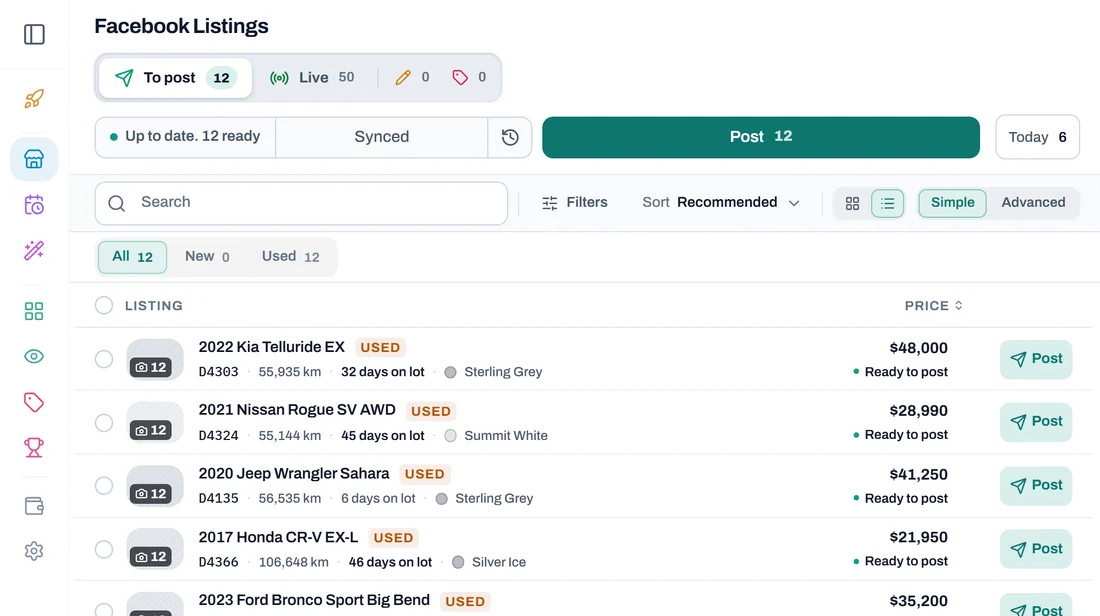
Every unit gets written up
Each vehicle gets a title and a description built from its own specs and photos. No keying anything in twice.
Prices follow the lot
Move a price in your inventory and your next Sync updates the listing to match, so nobody walks in quoting a number you dropped last week.
Sold units come down
A car that sells comes down the next time you press Sync, so you stop fielding calls on a car that left the lot on Tuesday.
It runs on your computer, not on somebody's server.
This is the part that matters and the part most tools get wrong. Activity from a data centre looks nothing like a salesperson at a desk, and Facebook treats it that way.
Your machine, your connection, your login
Everything happens on your own computer. Nothing posts from a rented server in another country, because that is what gets accounts flagged.
It stops when Facebook says stop
Facebook's limits are Facebook's to set, and the app respects them rather than working around them. If it is told to wait, it waits, and it tells you.
Queue it from anywhere. It posts from the lot.
Sign in from your phone on the way back from a delivery, look at what's waiting, and line it up. The desktop machine sends it out when it comes up in the queue. That split is on purpose: the browser is for looking and deciding, your own computer is what talks to Marketplace.
Does it post to Facebook Marketplace on its own?
You pick the cars, and it posts them from your own computer. You don't have to sit there while it does.
Will this get my Facebook account flagged?
Nobody can promise you it won't, and be suspicious of anyone who does. What we can tell you is how it is built. Every post comes from your own computer, your own connection and your own sign-in, so there is no shared server and no second account posting on your behalf. Facebook's limits are Facebook's to set, and the app respects them rather than working around them: if it is told to wait, it waits, and it tells you.
Do I give it my Facebook password?
No. You sign in on Facebook's own page, in a window inside the app, and the app never asks for or keeps your Facebook password. The sign-in stays on that computer. If Facebook signs you out, the app tells you and offers the same Sign in to Facebook button.
Can I use it from my phone?
You can sign in from a phone or any browser to look at your inventory, read what's been written, and line vehicles up. The posting itself happens in the desktop app, so that computer needs to be on.
Does it take listings down when a car sells?
Yes. Press Sync and the cars that sold come down, and you tap the ones you sold yourself. You are not answering calls on something that's gone.
Is this made by Facebook?
No. MRKT Manager is an independent tool and is not affiliated with, endorsed by, or sponsored by Meta Platforms, Inc., Facebook, or Instagram. You use your own Facebook account with it.
Check whether your inventory comes through.
Enter your dealership name and find out on the spot. No account, no card.